There’s a moment every small business owner knows. You check your phone. Nothing. You check your email. Nothing. You know your website is live because you can pull it up yourself. But nobody is calling from it. Nobody is filling out the contact form. The site just sits there, and you sit here, wondering what you’re missing.
I’ve had this conversation hundreds of times over twenty-plus years of building websites for small businesses. And almost every time, the business owner comes in thinking the problem is one thing when the real problem is something else entirely.
So let’s get into it. The real reasons your website is not getting calls, and what you can actually do about it.
Key Takeaways
- A silent phone is almost never a design problem
- Most websites fail to generate calls because of clarity, trust, and visibility issues working together
- Google has to find you, understand you, and trust you before it sends anyone your way
- AI search tools are now part of how people find local businesses, and most sites aren’t ready
- You don’t need to rebuild from scratch to fix most of these problems

Written by Dotty Scott
Founder of Premium Websites, Inc.
Empowering small businesses to go from Invisible to Invincible.
Table of Contents
- The Phone Test Every Small Business Owner Knows
- What Most People Blame (And Why They’re Wrong)
- The Real Reasons Your Website Is Not Getting Calls
- The Visitor Who Almost Called You
- What Google Needs to See Before It Sends You Anyone
- The AI Search Problem Nobody Is Talking About Yet
- How to Start Fixing This Without Starting Over
- The Bottom Line
- Frequently Asked Questions
The Phone Test Every Small Business Owner Knows
Here’s the test I want you to run right now.
Open your website on your phone. Not your laptop. Your phone. Then ask yourself honestly: if I landed on this site as a total stranger, would I call this business?
Not “does it look nice.” Not “does it load.” Would you actually pick up the phone and call?
Most business owners pause at that question. Because when they look at their site through a stranger’s eyes, they start to see things they’ve stopped noticing. The headline sounds good, but doesn’t actually say what the business does. The testimonials are buried three scrolls down the page. The contact button requires hunting. The About page talks about values and mission, but never mentions how long they’ve been in business or what makes them different from the next person who does the same thing.
That moment of honest seeing is where the work starts.
At Premium Websites, Inc., I’ve built more than 400 websites and looked at probably twice that many. The sites that generate calls share certain characteristics. And the sites that don’t generate calls share different specific things in common. The gap between them is rarely about design. It’s almost always about clarity, trust, and visibility working together.
If you haven’t already, read Post 1 in this series , where I break down the difference between a website that exists and one that actually works. This post picks up from there.
What Most People Blame (And Why They’re Wrong)
When the phone isn’t ringing, most small business owners go to one of three explanations.
“My design isn’t good enough.” So they invest in a redesign. The new site looks better. The phone still doesn’t ring. Because the problem was never the design.
“I need to be on social media more.” So they start posting regularly on Instagram or Facebook. They get likes and comments. No calls. Because social media attention and website lead generation are two different things that don’t automatically connect.
“I need to run ads.” So they put money into Google Ads or Facebook Ads and get some traffic. A few leads trickle in while the ads are running. The moment the ads stop, so does the traffic. Because paid traffic is rented visibility, not owned visibility.
None of those things are wrong exactly. A well-designed site matters. Social media has value. Ads can work. But none of them fix the underlying problem, which is that the website itself isn’t built to earn calls from organic search.
Full transparency: I see this pattern constantly. Business owners spend money on the visible things because those feel like doing something. Meanwhile the structural issues that are actually blocking calls don’t get touched. I wrote about this in more depth in Why Your Website Gets Traffic but No Leads if you want to dig into the data side of this problem.
The Real Reasons Your Website Is Not Getting Calls
These are the actual culprits. Not the obvious ones. The ones most people miss.
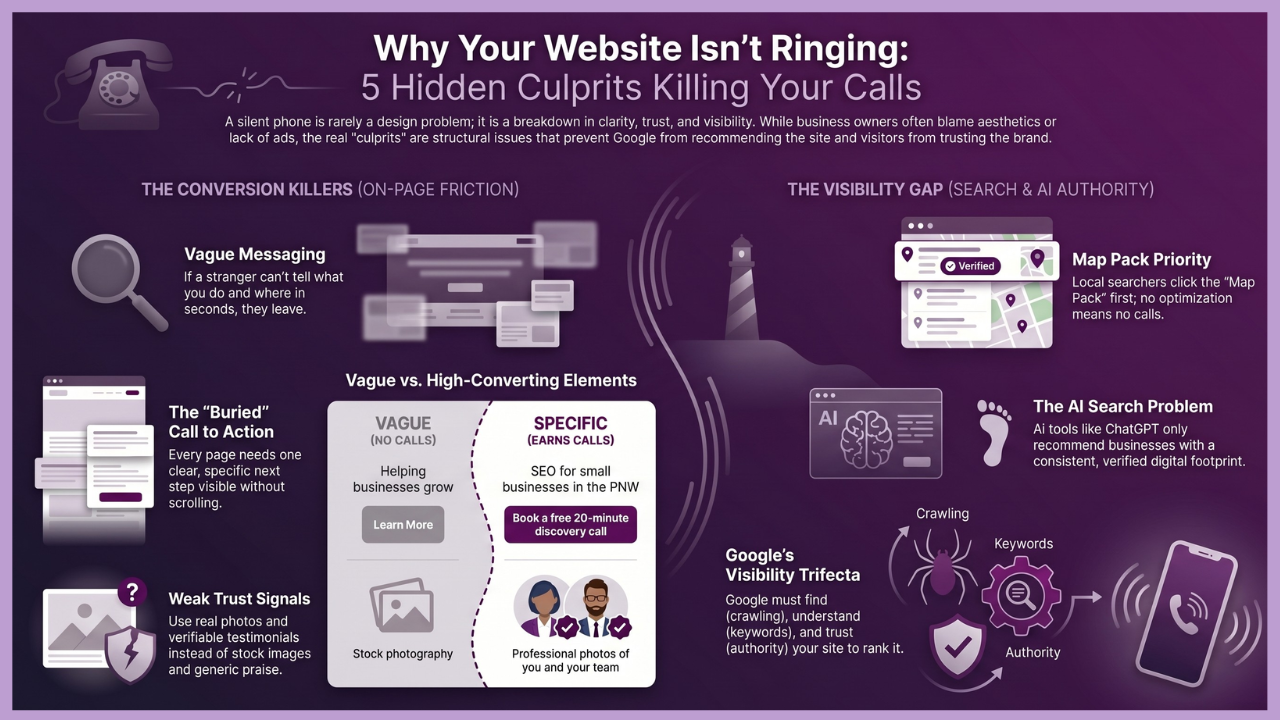
Your Messaging Is Too Vague
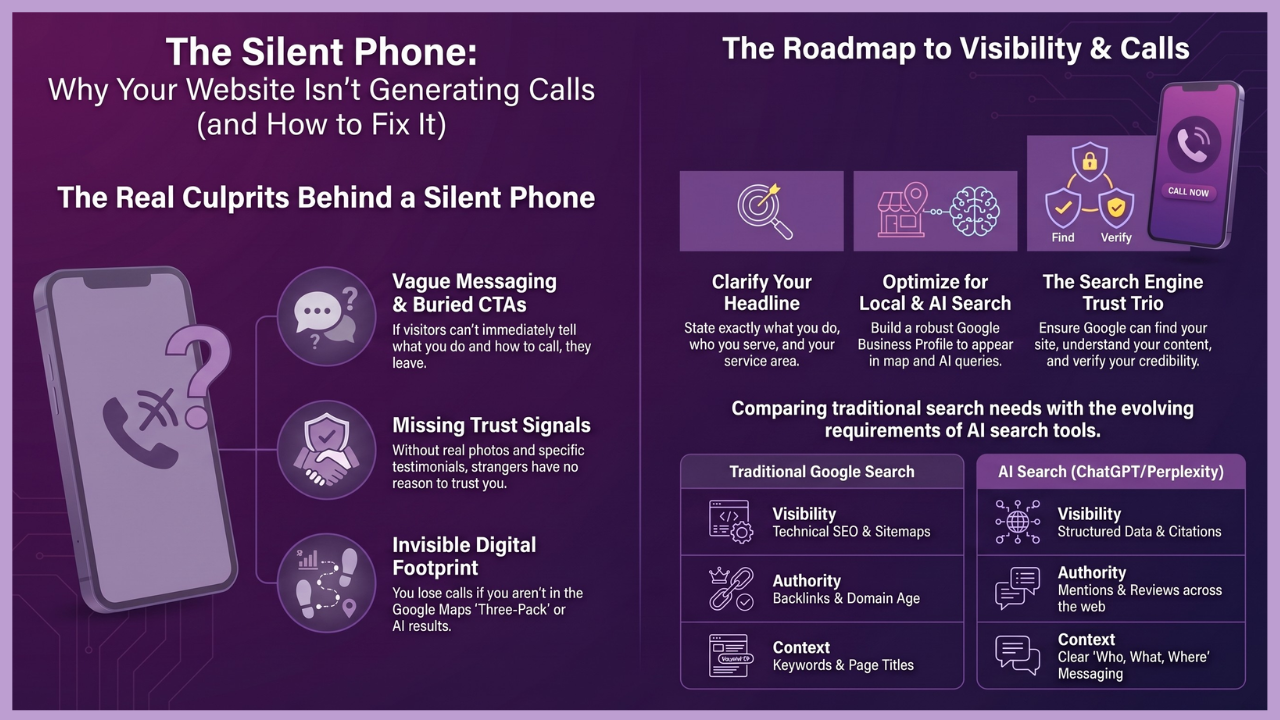
Visitors decide in seconds whether they’re in the right place. If your headline says “Helping businesses grow” or “Quality service you can trust,” they have no idea what you actually do. Those phrases could describe a thousand different businesses in a thousand different industries.
A headline that earns calls says specifically what you do, who you do it for, and where you do it. “WordPress websites and SEO for small businesses in the Pacific Northwest” is a headline that makes someone say, “That’s exactly what I need.” “Your partner in digital success” can leave people saying nothing and clicking away.
Look at your homepage headline right now. If a stranger couldn’t tell from that one line what you sell and who you sell it to, that’s your first fix.
Your Call to Action Is Buried or Vague
Every page on your website should have one job. And that job should end with a clear, specific next step for the visitor.
“Learn more” is not a call to action. “Contact us” by itself isn’t very effective. “Book a free 20-minute discovery call” is a call to action. “Download the free guide” is a call to action. “Call us at 360-607-4767 and let’s talk about your site” is a call to action.
The call to action needs to be visible without scrolling. Please make it specific about what happens next. And it needs to appear on every page, not just the contact page. Most people never make it to the contact page if nothing earlier in the site has given them a reason to go there. You can see a good example of how this works on our discovery call page — one clear action, one clear outcome.
Nobody Can Find You in the First Place
This is the one that stops everything else from mattering. If Google isn’t showing your site to people who are searching for what you do, the clarity of your messaging and the strength of your call to action are irrelevant. Nobody sees them.
Getting found requires more than having a website. It requires that Google understand what your site is about, trust your site enough to recommend it, and match your pages to the searches your ideal clients are actually making. That’s a visibility problem, and it’s the one I’ll spend more time on below.
Your Trust Signals Are Missing or Weak
Someone finds your site. They read your headline. They understand what you do. And then they hesitate. Because they don’t know you, they’ve been burned before by a bad vendor or a disappointing service. They’re weighing the risk of reaching out against the effort of looking at one more option.
What tips that balance toward calling you is trust. Real, specific, verifiable trust signals. A professional photo of you, not a stock image. Testimonials with real names and real outcomes, not generic praise. An About page that tells your actual story, your years of experience, the clients you’ve served, and the problems you’ve solved. Awards, certifications, and media mentions, if you have them. A clear address or service area.
You can see what trust signals look like in practice on our reviews page and awards page. These pages exist for a reason. They’re doing work every time someone visits them.
When those things are missing from your site, strangers have no reason to trust you over anyone else. And so they don’t.
Your Site Isn’t Optimized for Local Search
Most small service businesses rely on local clients. And local search works differently from general search. Google prioritizes businesses that are clearly located in or serving a specific area, have an optimized Google Business Profile, show consistent name, address, and phone number information across the web, and have local reviews.
If your website doesn’t mention your city or service area in your page titles, headings, and body copy, Google won’t show you to people searching in your area. If your Google Business Profile is unclaimed or half-finished, you’re giving your competitors visibility in that map pack.
Did you know: Here’s something that surprises most people. You can rank on page one of Google for your service and still get almost no calls if your Google Business Profile isn’t optimized. That’s because most local searchers click on the map pack first, which appears above the organic results. If you’re in the map pack, you get calls. If you’re not in it, the people who would have called you are calling someone else. Our post on why your Google Business Profile is so important goes into this in more depth if you want to understand what a fully optimized profile looks like.
The Visitor Who Almost Called You
I want you to think about a specific person for a moment.
She’s a business owner. She runs a small consulting practice. She’s been burned by a cheap web designer who disappeared after taking her money. She’s been paying an SEO agency for eight months with nothing to show for it. She’s tired, skeptical, and careful. But her current website is costing her clients and she knows it.
She types her search into Google. Your site comes up. She clicks.
She lands on your homepage. The headline is vague. She scrolls a little, looking for something that tells her you understand her situation. She doesn’t find it quickly. She sees a contact form somewhere near the bottom. She’s not ready to fill it out because she doesn’t know enough about you yet.
She hits the back button. She clicks on the next result.
That visitor almost called you. She was your ideal client. She was ready to hire someone. She just needed thirty more seconds of the right signals and she would have picked up the phone.
That’s what a website that isn’t doing its job costs you. Not dramatically. Quietly. One almost-call at a time.
Now reverse it. What if she landed on a page with a clear headline that named her problem? What if she saw a testimonial from someone who described the same frustration she’s feeling right now? What if there was a specific, low-commitment next step she could take without having to commit to anything big? She would have called.
That’s the difference between a site that generates calls and a site that almost does.
What Google Needs to See Before It Sends You Anyone
Getting calls from your website starts before anyone lands on your site. It starts with whether Google decides to show your site in the first place.
Google makes that decision based on three things working together.
Can it find your site? This sounds basic, but it’s not. Google finds pages by following links and reading your sitemap. If pages on your site aren’t linked properly, if your sitemap hasn’t been submitted to Google Search Console, or if technical errors are blocking Google from crawling your site, those pages don’t exist in search results even if they exist on your site. Our post on technical SEO for service businesses covers exactly what Google needs to see on the backend of your site.
Does it understand what your site is about? Google reads your page titles, your headings, your meta descriptions, and your body copy to understand what each page covers. If those elements are vague, missing, or optimized for the wrong terms, Google either misunderstands your site or can’t match it to relevant searches. This is the core of on-page SEO for service businesses and it’s where most small business sites fall short.
Does it trust your site enough to recommend it? Trust comes from signals that tell Google your business is real, established, and credible. Those signals include how long your site has been active, how consistently your business information appears across the web, how many other sites link to yours, how many reviews you have and where they appear, and whether your site loads fast and works properly on mobile. This is what I call your digital footprint, and it’s what the WebHub system is built to establish.
All three of those things have to work together. A site that Google can find but doesn’t understand won’t rank for the right searches. A site that Google understands but doesn’t trust won’t rank above competitors who have stronger authority signals. And a site that Google can’t find at all is invisible no matter how good the content is.
This is why website visibility for small business is about structure and signals, not just content.
The AI Search Problem Nobody Is Talking About Yet
Google isn’t the only place people look for businesses anymore.
ChatGPT processes more than two billion queries every day. Perplexity is growing fast. Google’s own AI Overviews now appear on a significant portion of all searches. And when someone asks one of these tools, “Who’s a good accountant in Portland?” or “Recommend a web designer in Vancouver, Washington,” the tool generates an answer from what it knows about businesses online.
If your digital footprint is thin, you’re not in that answer.
This matters because the people using AI tools to find businesses are often exactly the clients you want. They’re doing research. They’re ready to hire. They’re asking specific questions about specific services in specific locations. And right now, most small business websites are completely invisible to these tools because they haven’t built the kind of structured, consistent digital presence that AI systems use to verify and cite businesses.
The same things that help with traditional Google visibility generally help with AI visibility too: clear content, strong trust signals, consistent business information across the web, schema markup, and a robust Google Business Profile. But AI tools also look at third-party mentions, review platforms, directory listings, and whether your business is being discussed or referenced outside your own website.
Our post on AI search optimization for small businesses goes deep on this topic. And if you want to see where your business actually stands in AI search right now, you can run a free check at aeoscoreboard.com. It takes a few minutes and shows you your AI visibility score across the categories that matter.
Building the kind of presence that gets you found in both Google and AI search is exactly what the WebHub system is designed to do. It’s not just a website. It’s the entire connected ecosystem that signals to both Google and AI tools that your business is real, credible, and worth recommending.
How to Start Fixing This Without Starting Over
You don’t need to tear down what you have and start over. Most of the fixes that move the needle are changes to what’s already there.
Start with your homepage headline. Make it specific. Name what you do, who you do it for, and where. If it takes more than one read to understand what you sell, rewrite it.
Check every page for a clear call to action. Not buried at the bottom. Visible without scrolling. Specific about what happens next.
Set up Google Search Console if you haven’t. It’s free, and it shows you exactly what Google sees when it looks at your site, which pages are indexed, which searches are bringing people to you, and which technical issues are getting in the way. Our post on measuring SEO results walks you through how to read what you find there.
Claim and fully complete your Google Business Profile if you haven’t. Add photos. Add your services. Add your hours. Respond to reviews. Post updates. Download our free Google Business Profile checklist to make sure you haven’t missed anything.
Then grab the 26 Visibility Fixes guide at websitevisibilitychecklist.com. It covers the specific things that help Google and AI tools find you and trust you enough to send you calls. No jargon. No redesign required. It’s organized into on-site and off-site fixes so you can see the full picture of what’s affecting your visibility right now.
If you want a second set of eyes on your specific site, that’s what a discovery call is for. I’ll show you exactly what Google sees, where you’re missing signals, and what the most important fixes are for your situation.
The Bottom Line
A silent phone is not a sign that your business isn’t good enough. It’s a sign that the right people can’t find you, or can’t quickly tell when they land on your site that you’re exactly what they need.
That’s a fixable problem. It’s not a rebuild-from-scratch problem. It’s a look-at-the-right-things-and-make-intentional-changes problem.
I’ve been doing this for over twenty years. The businesses that go from invisible to invincible aren’t always the ones with the biggest budgets or the prettiest sites. They’re the ones who stop guessing and start building the right foundation.
Start at websitevisibilitychecklist.com. See what you’re missing. Then let’s talk.
Frequently Asked Questions
Why does my website get visitors, but nobody calls?
Traffic and calls are two different things, and a lot can go wrong between someone landing on your site and picking up the phone. The most common reasons are: your messaging doesn’t quickly tell them they’re in the right place; your trust signals aren’t strong enough to overcome their hesitation; your call to action isn’t clear or visible; or your site loads too slowly on mobile, and they leave before reading anything. Any one of those can kill a potential call. When more than one is present, the site generates almost no leads, even with decent traffic. Our post on why your website gets traffic but no leads goes deeper on the traffic side of this equation.
How do I know if Google is actually sending people to my website?
Google Search Console is the tool you need. It’s free, it connects directly to your site, and it shows you which search terms are bringing people to your site, how many times your site appeared in search results, how many people clicked, and which pages are getting the most visibility. If you’ve never set it up, that’s the first step. If you set it up and your impression numbers are very low or your click-through rate is below 2%, that tells you Google is either not finding your site for the right searches or people aren’t choosing it when they do see it. See our post on measuring SEO results for a plain-English walkthrough of what to look at.
What is the Google Maps three-pack, and how do I get in it?
The Google Maps three-pack is the block of three local business listings that appears at the top of search results when someone searches for a local service. It shows a map and three business names with ratings, hours, and contact information. It appears above the regular organic search results, which means the businesses in it get seen first. Getting into it requires a fully optimized Google Business Profile, consistent business information across the web, local reviews, and a website that mirrors the profile’s information. It’s not instant, but it’s one of the highest-value things a local service business can work toward.
Should I be worried about AI search tools like ChatGPT for my local business?
Yes, and the sooner the better. AI search tools are becoming an integral part of how people find businesses, especially for service searches, where people do research before making a decision. If your business doesn’t have a strong, consistent digital presence with clear information about who you are, what you do, and where you serve clients, AI tools won’t mention you. The good news is that building AI visibility and traditional SEO visibility use many of the same strategies. Read our post on how service-based businesses can get found in AI searches for a practical starting point. You can also check your current AI visibility score for free at aeoscoreboard.com.
How long does it take to start getting calls from a website?
It depends on what’s currently missing and how competitive your market is. Some fixes have a fast impact. Improving your homepage headline and call to action can make a difference within days for visitors who are already finding your site. Fixing your Google Business Profile can improve local map visibility within a few weeks. Building organic search authority through content and digital footprint work typically takes three to six months to see meaningful movement. The businesses that get frustrated and quit are the ones that expected overnight results from a slow-building strategy. The ones who stay consistent are the ones whose phones eventually don’t stop ringing. Our 90-day small-business SEO plan gives you a realistic timeline and a clear sequence to follow.
Read the rest of the posts in this series: The Honest Truth about Your Website
- Is Your Website Actually Working? (Or Just Sitting There Looking Pretty)
- Why the Phone Isn’t Ringing (And It’s Probably Not What You Think)
- The Truth About AI-Built Websites (What They Don’t Tell You Before You Click Generate)
- The Truth About Wix, Squarespace, and DIY Website Builders
- What a Good Web Designer Actually Does (And Red Flags That Say Run)
- Why Your Competitor Shows Up on Google and You Don’t
- What Is Schema Markup (And Why You Should Care)
- Does Your Business Show Up in ChatGPT? Here’s How to Find Out